Every now and then, Ultrawidify gets a 2000 IQ idea in the mail:
- Hey, autodetection should detect subtitles and it’s very annoying that it doesn’t
which is often (but not always) followed to a link that makes me silently judge people’s music tastes. Back in the day, such requests were ignored “because performance.” However, now that autodetection uses webgl, performance issues have been resolved to a large extent, and with autodetection taking only ~1-3 ms per run … that leaves us quite some space in our 16 ms budget. So let’s do subtitle autodetection.
But how do we do that?
Now, I could probably train a computer vision model and take great care to never ever call it AI in public in front of normies. However, CV probably isn’t free to run, and I’d have a lot of work cut out for me if I went this route. So let’s see if we can bolt something on top of our existing algorithm.
Going this route means we have to actually define how our algorithm that can only check one (sub)pixel at a time should differentiate between image and subtitles. So let’s go and find a sample video with baked subtitles.
This took a bit (especially since modern music lyrics videos just put the subtitles in the subtitle track instead of baking them into the video file), but eventually I manage to find an example.
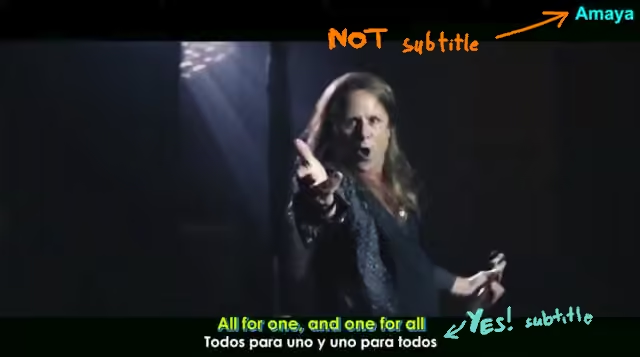
So let’s see what we have. First of all, we have some letters in the upper right corner. That looks a lot like channel “logo”, which we don’t care about and should ideally be cropped. The one thing that makes it very noticeably different from subtitles is that the logo is in the corner, not in the center.
Subtitles, in general, tend to be centered. They also tend to be very bright, at least almost full brightness in at least one of the color channels. There also tend to be some other neat properties:
- if subtitles are in the letterbox, there will be black (or at least dark) space between letters
- text tends to run left-to-right
- subtitles are static and do not move
If all these assumptions were correct, things would be super convenient for us. However, the universal laws of the universe state that things that seem convenient often aren’t particularly true. We know that arabic and hebrew are written from right-to-left. Fortunately for us, that doesn’t really change much in terms of item #2. However: if there’s cultures who didn’t get the memo and opted for writing in the opposite direction … could there also be cultures that decided that perpendi—
Okay I’ll spare you the theatrics. If you’re from any country with access to the not-so-modern-anymore technology like movies or TV or especially the internet, then you have probably learned through osmosis that at least traditionally, China and Japan have done their writing vertically by the time you were 15.
In practice, ICNU tends to list vertical writing systems as critically endangered, sometimes even borderline extinct in the wild. In modern contexts — and especially when used as subtitles — even vertical languages tend to write things out in horizontal direction (but exceptions exists — apparently, japan will do vertical subtitles for certain movies and/or artistic productions). More importantly, if a video has vertical subtitles … they aren’t gonna be in the bottom or top letterbox. Which means they’re in no danger of actually being cropped by Ultrawidify. (That is, unless I decide to implement autodetection for pillarbox as well, but pillarbox autodetection is so niche you’ll have to manually enable it).
So turns out we can assume #2 without any risk.
What does all of this mean for our subtitle detection algorithm?
When we capture a frame of video, we could start scanning rows, in the following manner:
- Start on the left
- check whether the pixel is dark or very bright (but ignore the middle values). Make a note of that.
- move one pixel to the right. Check whether this pixel is also dark or very bright
- if this pixel is bright and the previous pixel wasn’t, we encountered a new letter. Set letter size counter to 0. Increase the letter counter by one.
- if both this pixel and the previous one are bright, increase the letter size counter by one
- if the letter size counter becomes too big, we probably aren’t looking at a letter01This turns out can be problematic for Arabic subtitles in the bottom letterbox or indian subtitles in the top letterbox, but we’ll ignore that for the time being. Let’s get the base case working first, and see whether any effort remains for the edge cases.
- (you could similarly track the size of dark gaps, but we’ll ignore that)
- Look at how many letters were detected. While subtitles can, in certain edge cases, contain very few letters, let’s require at least 5 letter detections. This is less than ideal, however not having any minimum character limits can result in false positives.
- Repeat this over a few rows
The neat part of this algorithm is that it’s very compatible with how the image is stored in computer memory. In computer memory, image is stored as one row of pixels:
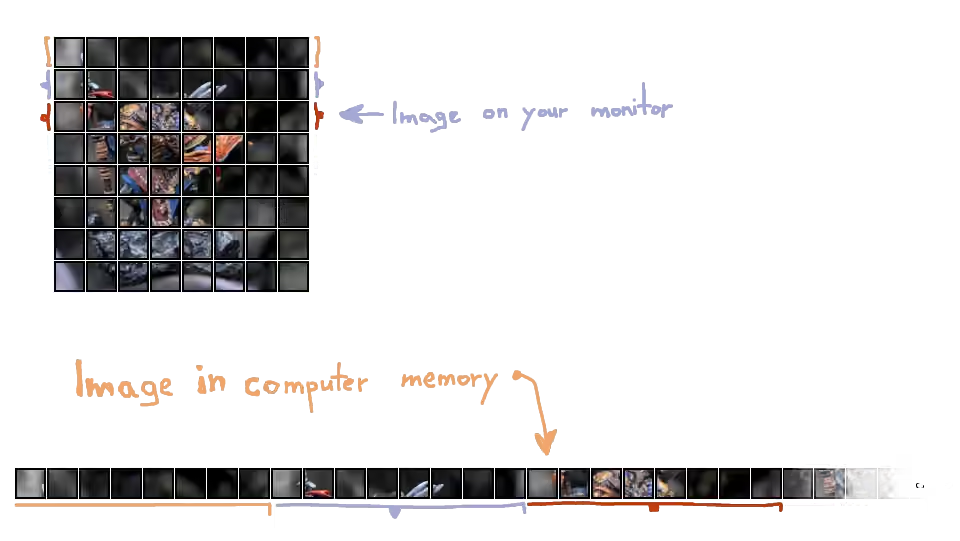
This makes it very easy to check the value of one pixel to the left or one pixel to the right, while checking pixels above or below requires slightly bit more work.
This approach generally works well on “ideal subtitles” like on the video somebody linked me. Subtitles seem to get detected and everything seems to work. If I bring up my debugging tools, the “subs confirmed” seems to stay for most of the time.
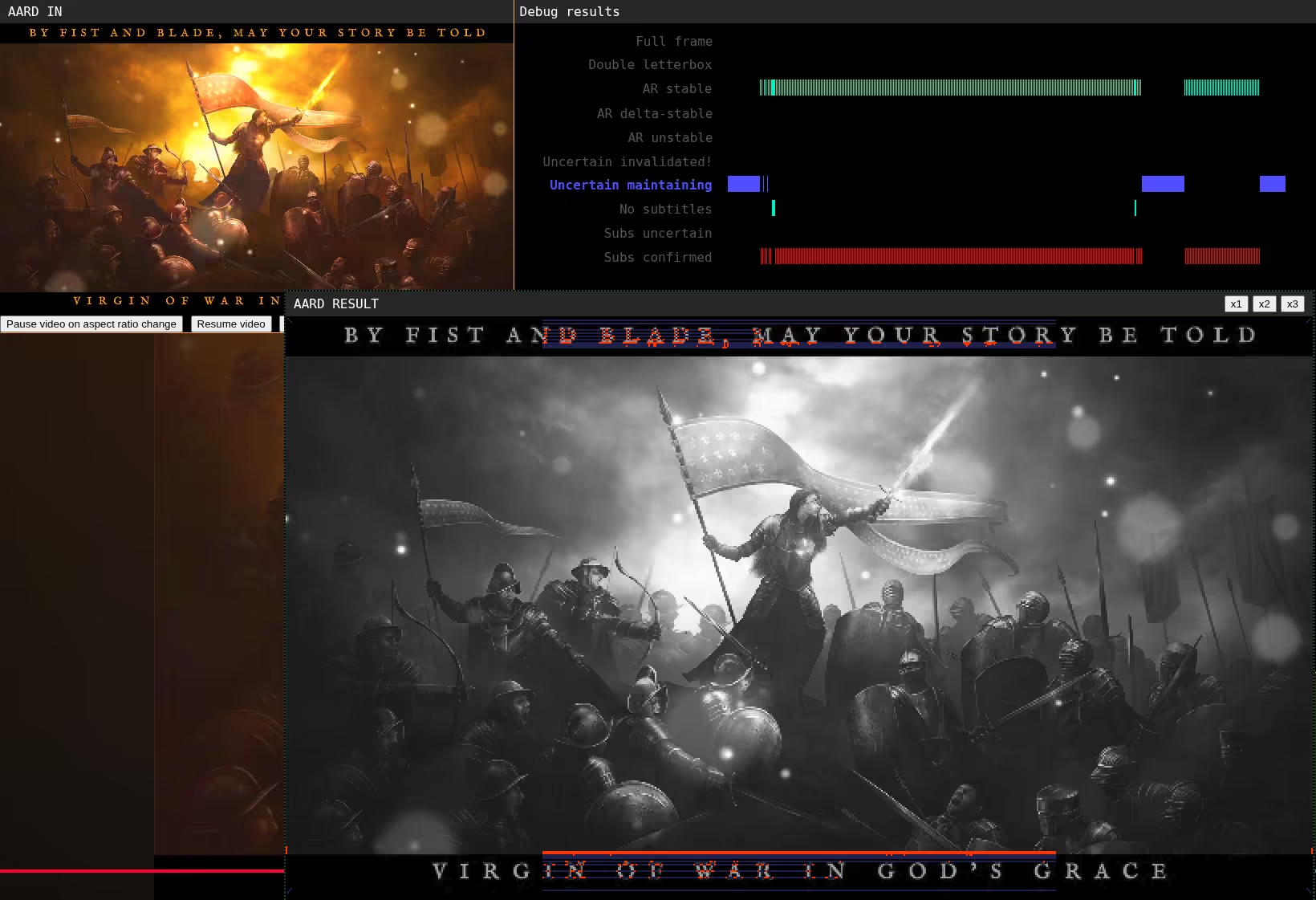
Now, sometimes subs won’t get explicitly detected, with extension instead giving “can’t determine aspect ratio, will keep whatever I have” status, but this doesn’t seem to cause too many issues right now.
I wonder what happens if I put on a fan-subtitled video of a song by a lesser band.
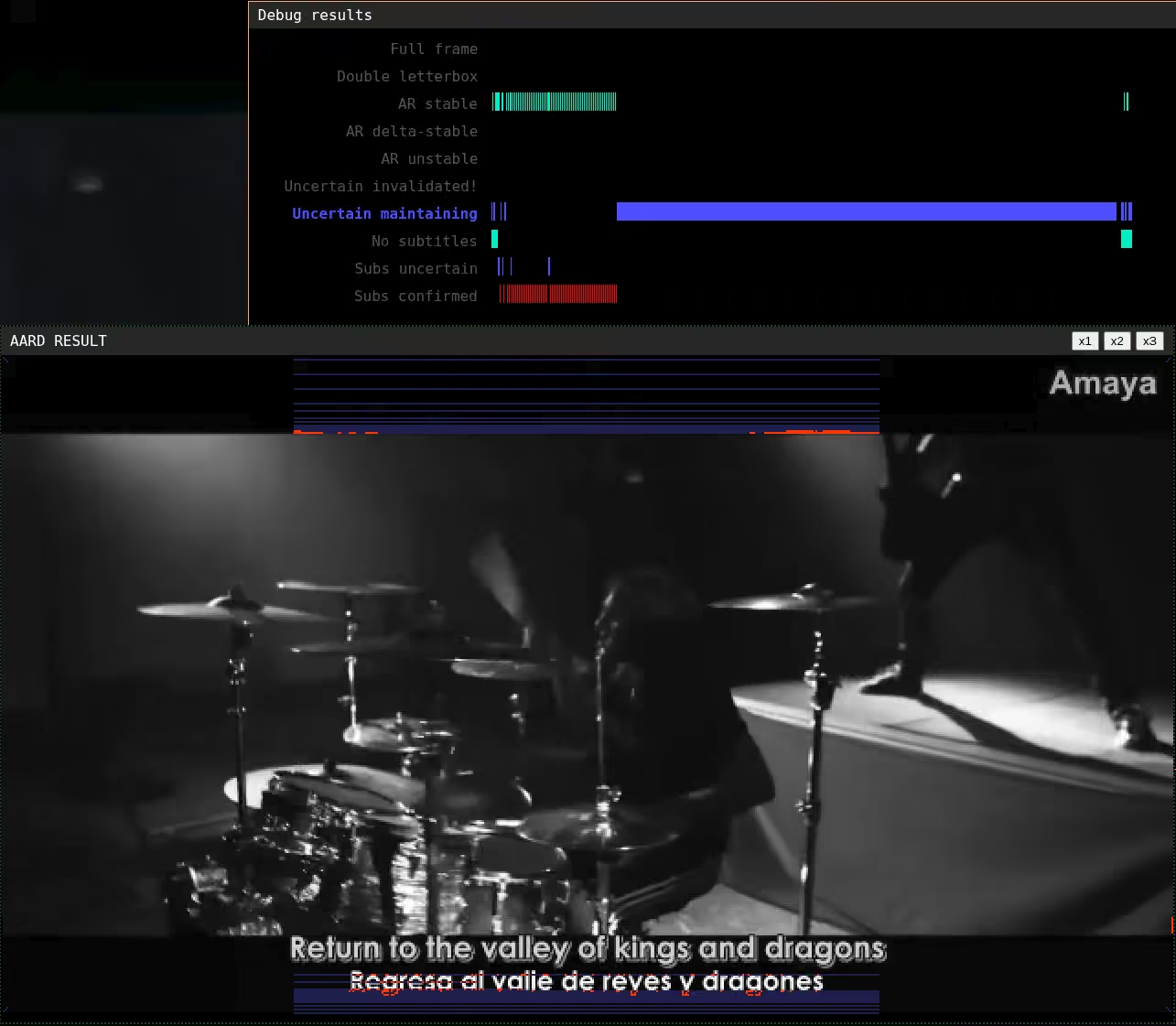
Those subtitles look a lot like they should be getting detected. However, the cursor graph (where the trail is being drawn) is almost all the way on the right, but there’s no red near the cursor.
On the other hand, I also had the opposite problem: subtitle detection very sporadically got triggered in random places that didn’t contain any subtitles (though I don’t have a screenshot for this — I resolved some of those issues before I even got the idea of writing this blog). So how do we throw out spurious subtitle detections?
We’ll gonna be leveraging the “subtitles dont move” but from earlier. This is gonna be suboptimal for people who build their subtitles word-by-word instead of flashing the entire line, but there’s no one-size-fits-all solution (short of training a computer vision model, and even then). There’s only balancing acts, tradeoffs and compromises. If we track detections in the last n lines that we check across the last m frames that subtitle detection ran on. For every line, we track up to 16 letter detections (specifically their starting position and their sizes). If those detections match between all last m runs on all n lines (and if it obeys all the other subtitle rules), then this is surely a subtitle.
This fixes the issue of spurious detections, but we still got dem type II errors. So what gives?
Because autodetection doesn’t run on full frame (it first scales down the video to 360p), the edge of the subtitles might become blurred a bit. This can cause the following situation. First, subtitle detection hits the lower edge of the subtitle. Because subtitles got blurred, none of the pixels registered bright enough to count as a subtitle. However, they were more than bright enough to register as image, so extension was like “yes, we found the edge of the video frame.”
The solution to this problem has two components. First one is to define three thresholds:
- this is probably image (low brightness level)
- this could be subtitle (significantly brighter, but still dark)
- this is definitely a subtitle (high brightness)
then, you count how many times a row switches between these three states. If the state changes often, then you’re very likely looking at a subtitle.
The other part of the solution is to ignore any short changes that exceed thresholds by minimal amounts, as those could be compression artifacts.
I go an implement those two things, and suddenly both aspect ratio detection and subtitle detection seem to work remarkably well (on this one video that I hope I never ever have to see again). Aspect ratio is stable and bang on, detected right through these subs, despite the fact that the video is over-compressed garbage with compression artifacts that can be seen from mars.
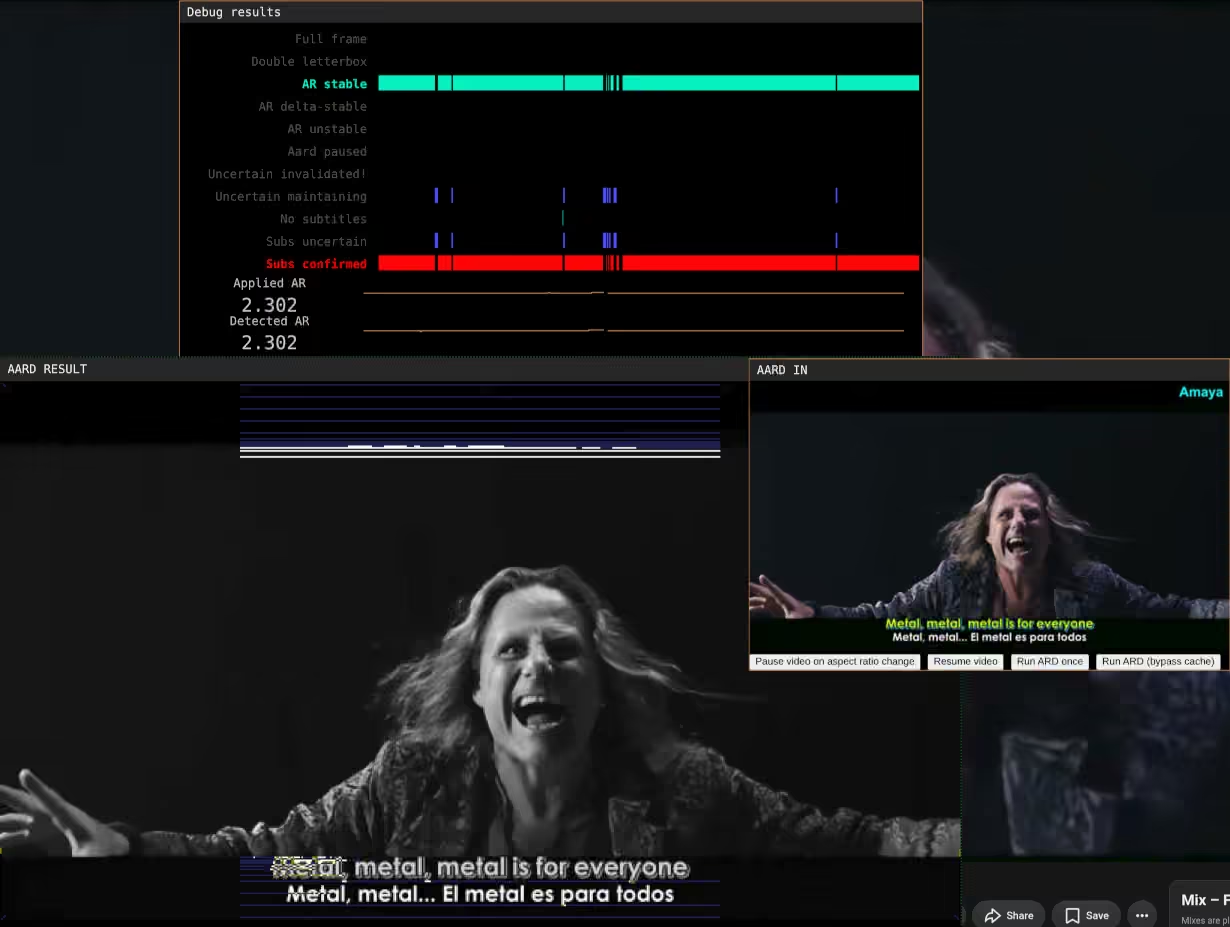
So, now that we got things working, what’s the cost? Because algorithm is no good if it causes everything to lag.
2-3 milliseconds per frame on average.12Granted, this is on a what used to be pretty much top of the line PC 8 years ago (2080Ti + Ryzen 7 5700G + Linux/CachyOS + Chrome), but it’s not 2018 anymore. Given ultrawide monitors are a “if you have one you aren’t exactly poor” kind of product, I don’t think it’s unfair to expect an average ultrawide user to have similar level of performance sitting under their desk. In this day and age, that should be midrange specs. Quick google confirms: 4060 isn’t that much worse, and 5060 is straight up better.
And it stays this way when you try to run stuff on 4K as well (mostly because 4K video is downscaled to 360p before being fed into detection algorithm):
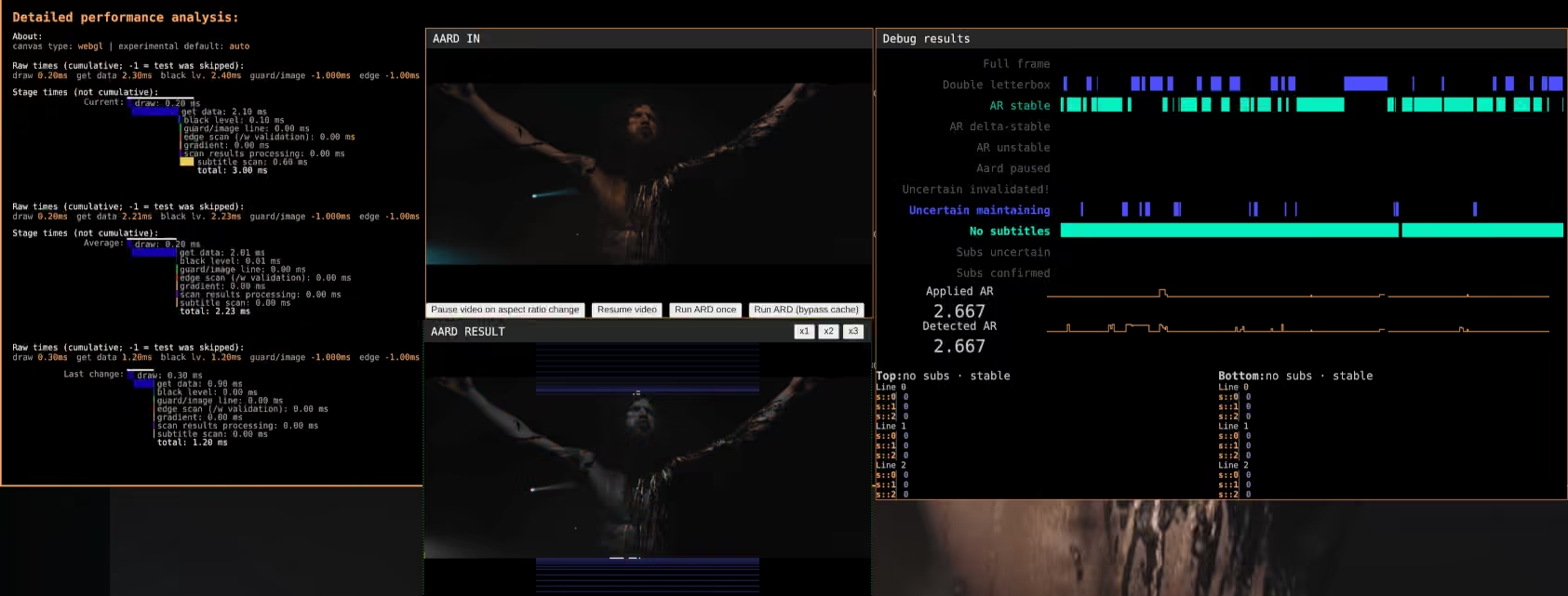
Realistically, I could probably start defaulting autodetection frequency to “run on every frame” (subtitle detection with uncertainty filter actually really benefits from this).
But I’m not exactly making this for only Chrome. Ultrawidify 7 is there because I want to have improved autodetection in Firefox. So let’s load it up in Firefox.
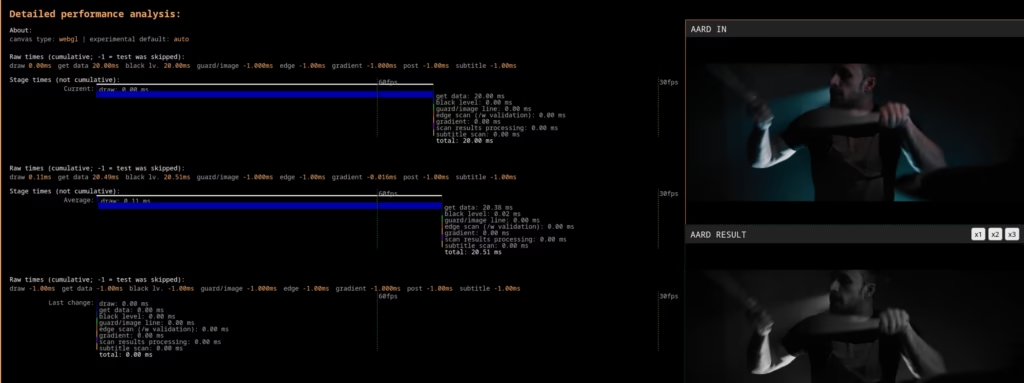
God fucking dammit. And it’s all in the “draw” phase as well, which is 100% up to the browser and I can’t do much about it, though Firefox cost does go down on 1080p videos. However, despite all that it doesn’t seem that the browser or video lags or stutters any more than before, so I guess we’ll call it a day.